Advanced
Essentials
Advanced options provide tools for adding subtle variations and advanced control over timing and pitch in your project. It contains Grooves for rhythmic feel and swing, and Tuning for pitch control and micro-tuning. Both are adjustable while the track is playing for immediate results.
Grooves for rhythmic feel and swing (adjust timing feel)
Tuning for pitch control and micro-tuning (adjust pitch per track)
Real-time adjustments while playing
Apply to individual tracks or globally
Grooves
Location |
Found in the Advanced Tab (groove icon in the left panel). |
|---|---|
Multiple grooves |
You can create as many grooves as you like. |
Groove Controls
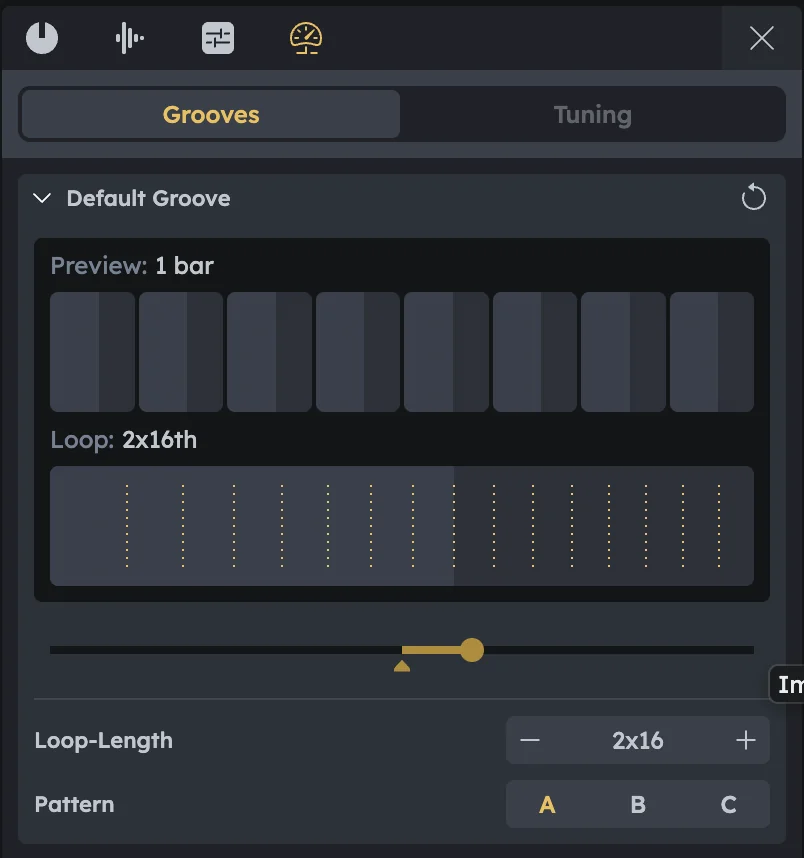
Preview |
Displays a 1-bar preview of how the groove affects timing. |
|---|---|
Loop |
Shows the groove loop resolution (e.g., 2×16th notes). |
Groove Amount |
Sets how strong the swing or timing shift is. |
Loop Length |
Defines the resolution of the groove pattern. |
Groove Modes |
Groove mode types:
|
Managing Grooves
Create new |
Use + New Groove to create more grooves. |
|---|---|
Track assignment |
Each note track can choose which groove it follows. |
Example setups |
Hi-hats with swing. Straight bassline (no groove). |
Workflow Example
Open Grooves |
Open Grooves in the Advanced Tab. |
|---|---|
Create groove |
Create a new groove and set Loop Length to 2×16. |
Test modes |
Switch between A, B, and C while the track is playing to hear the differences. |
Adjust amount |
Adjust the Groove Amount to exaggerate or soften the effect. |
Assign to track |
Assign the groove to a note track from the Timeline (see Timeline). |
Tuning
Location |
Found in the Advanced Tab, next to Grooves. |
|---|
Tuning Controls
Base Frequency |
Sets the global reference pitch (default A = 440 Hz). Lower for a warmer feel (e.g., 432 Hz). Raise for brightness. |
|---|---|
Micro-Tuning |
Adjust each of the 12 notes in the octave individually. Small shifts (±5–15 cents) add natural imperfection. |
Quick Workflows
Subtle analog feel |
Keep 440 Hz, apply ±5 cent detune across notes. |
|---|---|
Match external instrument |
Adjust Base Frequency until instruments lock in. |
Creative scale shaping |
Lower base slightly, then shift specific notes (thirds, sixths) to alter the mood. |
Practical Tips
Practical Tips
Always preview changes while looping chords.
Start with gentle shifts before making drastic ones.
Low notes make pitch differences more obvious—check your bass.