Rasselbock
Essentials
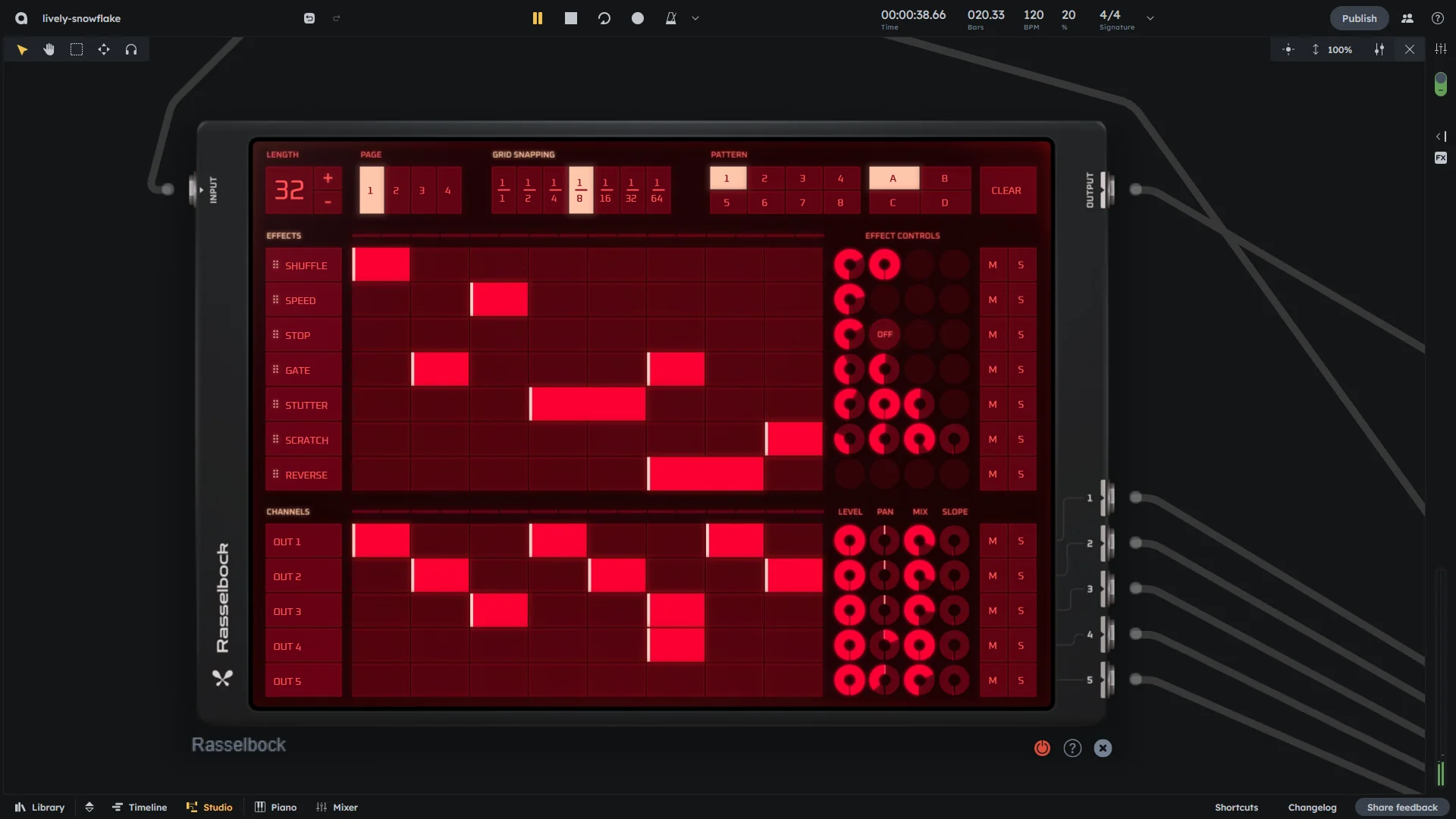
Rasselbock is a re-sampler with 7 built-in effects and 5 separate channel outputs. Route effect pedals through the device and trigger them in real-time by drawing blocks onto the sequencing grid. Perfect for subtle pitch changes, dramatic sound transformations, or complete track restructuring.
7 built-in effects with real-time sequencing
5 separate channel outputs
Block-based effect triggering
Reorderable processing chain
Controls
Pattern
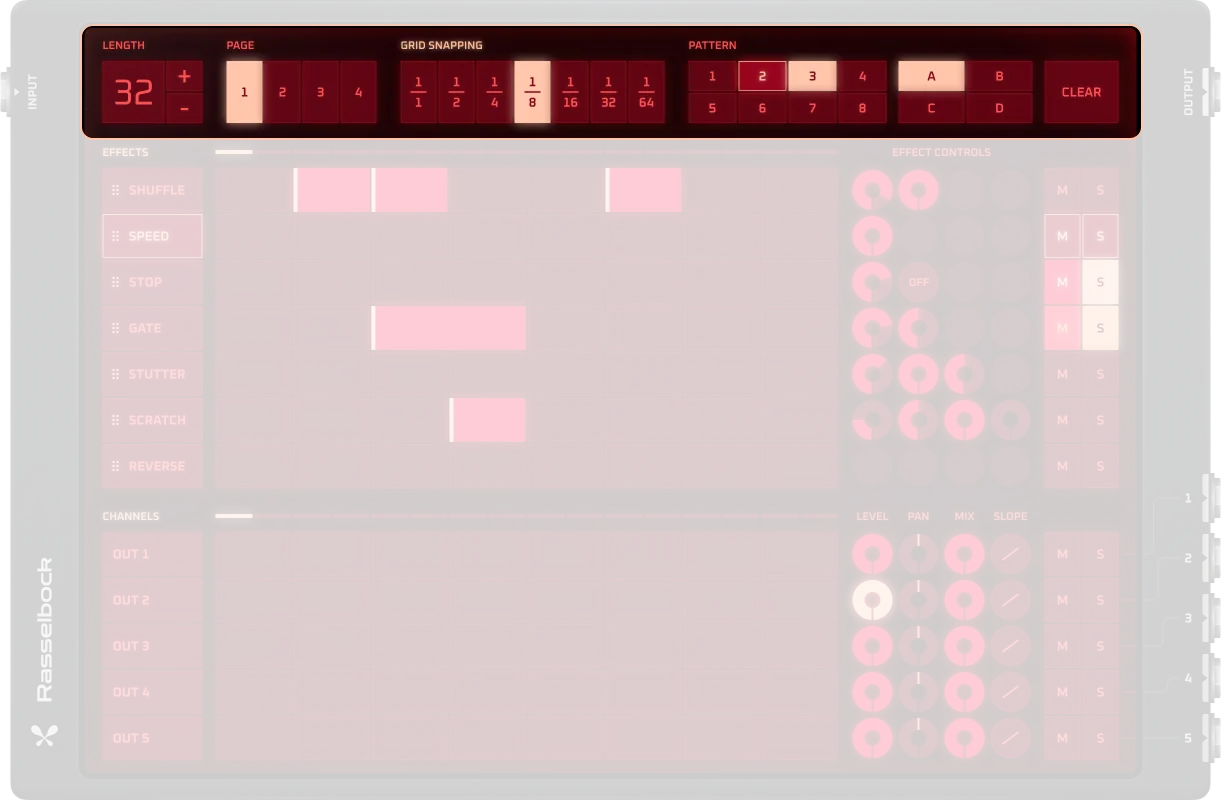
Like drum machines and other devices with internal sequencers, Rasselbock has 4 pattern banks (A, B, C, D) with each bank containing 8 patterns and an edit range of 64 steps.
Length |
Pattern length in steps (1-64 steps). One step is always 1/64th of a semibreve long |
|---|---|
Plus / Minus |
Increases or decreases sequence length. Hold Shift to double or half steps (2→4, 16→32, etc.) |
Page |
Navigate through 64-step sequences using the same 16 buttons (reuses buttons for different parts) |
Snapping grid |
Defines block placement grid (1/16, 1/8, 1/4). Hold mouse and drag to resize blocks |
Pattern / Bank |
4 banks (A–D) with 8 patterns each (total of 32 presets). Pattern index (0-31) determines which pattern is currently selected |
Clear |
Deletes the currently selected pattern |
On/Off |
Activates or bypasses the device . When off, audio signals bypass the effects and go directly to the main output |
Effects
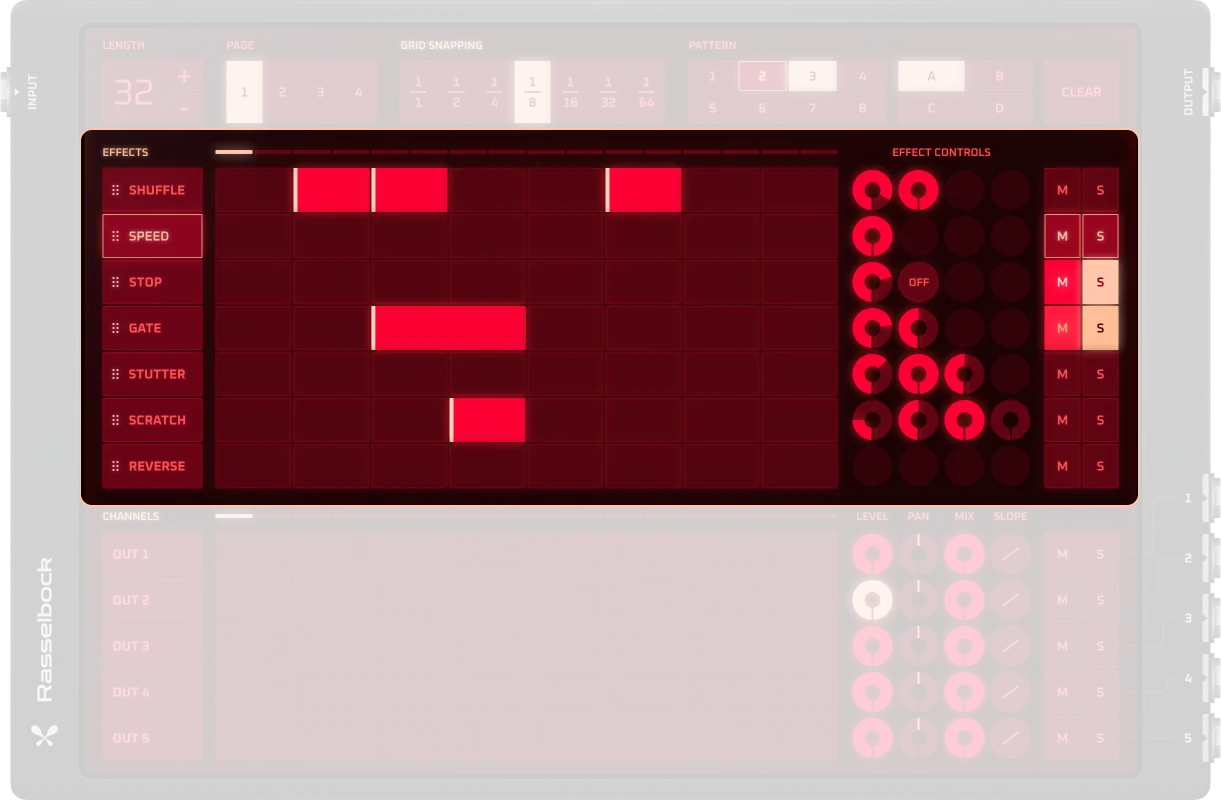
The 7 built-in effects can be added to the sequence by drawing blocks onto the sequence grid. Effects can be dragged to new positions in the list—the highest effect is applied first, then the second effect, and so on. This creates a processing chain where effects build upon each other.
Effect list |
Drag effects to reorder processing chain (highest = first, lowest = last) |
|---|---|
Sequencing grid |
Draw blocks to activate effects at specific steps |
Effect parameters |
Each effect has individual parameter controls. Shuffle and Reverse have minimal parameters (Shuffle has interval index, Reverse has none) |
Mute / Solo |
Mute individual effects or play them alone |
Channels
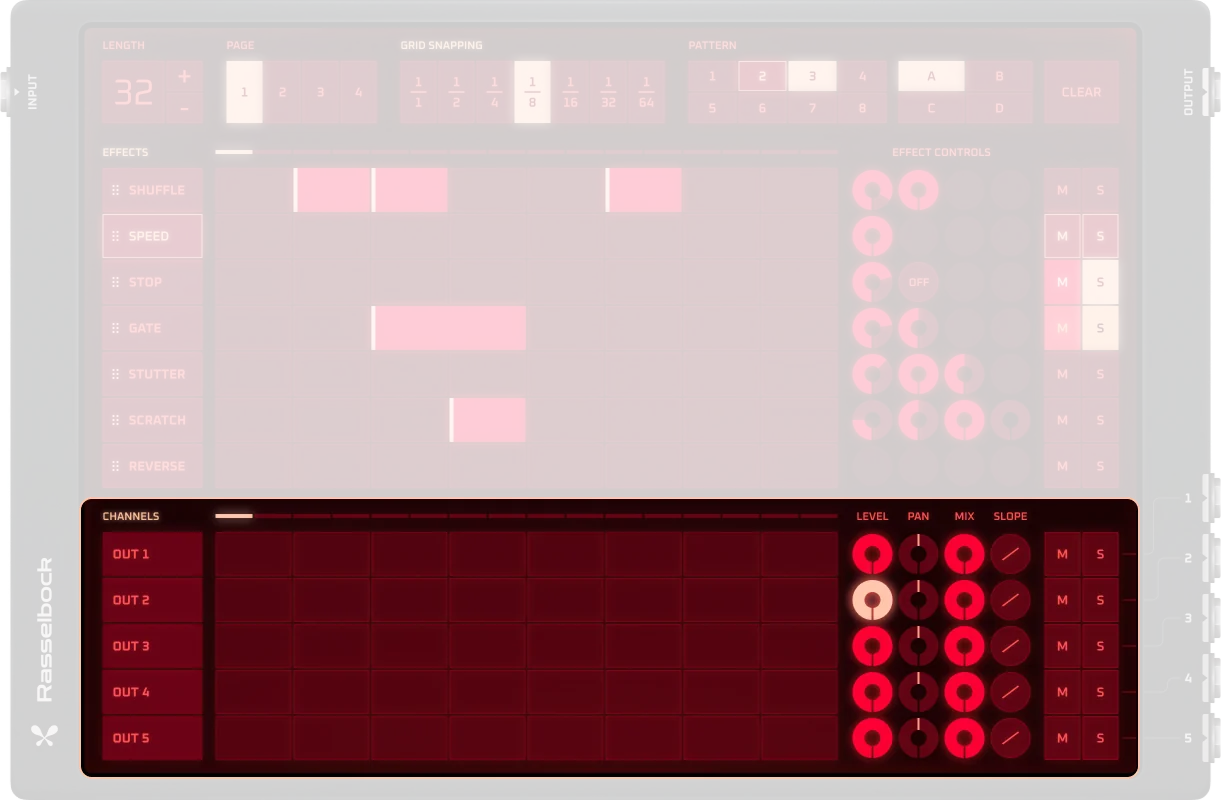
The 5 individual outputs are triggered only when blocks are drawn onto their channel in the grid. This lets you decide exactly when your arrangement is routed through separate outputs—useful for processing only parts of your track with specific effects or effect chains.
Sequencing grid |
Draw blocks to open output channels (e.g., blocks on channels 1&2 = signal through outputs 1&2) |
|---|---|
Level |
Output volume for each channel (0-100%). Equivalent to a dB range of -∞ to 0 dB |
Balance |
Stereo panning for each channel (-100 to 100). -100 = fully left, 0 = centered, 100 = fully right |
Dry/Wet |
Mix between dry (original) and wet (effected) signal (0-100%). 0% = no effects (dry), 100% = fully effected (wet) |
Mix/Energy mode |
Mixing mode:
|
Mute / Solo |
Mute individual channels or play them alone |
Built-in Effects
The 7 built-in effects can be added to the sequence by drawing blocks onto the sequence grid in the same way you trigger output channels. What’s different is that effects can be dragged to new positions in the list—the highest effect is applied first, then the second effect, and so on. All effects except Shuffle and Reverse have their own parameter controls. This makes Rasselbock extremely powerful since there are countless effect combinations possible.
Shuffle
The Shuffle effect randomizes the signal by writing incoming signals to a delay line and playing them back in segments at random positions. It’s not completely random since adding the same sized block to the same position creates the same effect. This differs from shuffle functions on drum machines—it’s specifically for signal randomization.
Interval Index |
Duration of the interval used for quantization of random positions (1-8). Controls the timing grid for shuffle segments |
|---|---|
Mute / Solo |
Mute individual effects or play them alone |
Speed
Slows down the sample and lowers pitch by changing the signal’s playback speed. The speed ratio determines how fast or slow the audio plays relative to the original.
Speed Ratio Index |
Speed ratio as a fraction of the original speed (0-16). Lower values slow down the audio, higher values speed it up |
|---|---|
Mute / Solo |
Mute individual effects or play them alone |
Stop
Abruptly stops the sample or instrument. Can optionally include a spinback effect that creates a pitch-down effect before stopping.
Duration Index |
Duration of the stop effect (1-8). Controls how long the stop lasts |
|---|---|
Spinback |
Enables or disables spinback effect . When enabled, creates a pitch-down effect before stopping |
Mute / Solo |
Mute individual effects or play them alone |
Gate
Turns the signal on/off rhythmically. Mimics the Gate effect pedal but is automatically synced to the rhythm of the input signal. The gate effect “gates” the audio (turns it on and off) in intervals defined by the interval duration.
Interval Duration |
Interval duration options:
|
|---|---|
Duration Factor |
The percentage within the interval during which the audio is turned on (0-100%) |
Mute / Solo |
Mute individual effects or play them alone |
Stutter
Repeats a small audio segment (glitch-style). Takes whatever sound is at the start of the block and repeats it until the end of the block.
Interval Duration Index |
Duration of the interval during which the signal is passed through (1-8). Controls the timing of stutter repetitions |
|---|---|
Duration Factor |
Out of the interval duration, how long the audio is audible for every interval (0-100%). Controls the on/off ratio within each stutter cycle |
Mute / Solo |
Mute individual effects or play them alone |
Scratch
Simulates DJ-style back-and-forth movement. Simulates a turntable style scratch—the length is determined by the length of the block drawn onto the sequencing grid. The effect writes the sample to a delay line and plays it back at a rate controlled by an oscillator.
Rate Bar |
The rate of the oscillator controlling the playback speed, and the length of the sample that’s written to the delay line (1-8). The effect will repeat the audio after this duration has passed |
|---|---|
Stretch |
Stretch factor affecting the scratch playback (0-100%). Controls the time-stretching behavior |
Tone |
Tone adjustment for the scratch effect (0-100%). Affects the frequency response |
Curve |
Modulation curve type:
|
Mute / Solo |
Mute individual effects or play them alone |
Reverse
Plays the second half of the block in reverse. Only the second half of the block is reversed because the Rasselbock needs the first half to record the sound into its internal buffer before playing it back in reverse.
Mute / Solo |
Mute individual effects or play them alone |
|---|
Example: Enhance a drum loop
Enhance a drum loop with rhythmic effects using Rasselbock’s step sequencer and built-in effects.
Load a drum loop into an Audio Track.
Add Rasselbock as an effect after the Audio Track.
Create a 16-step pattern by setting the length to 16.
Assign effects to different channels:
Channel 1: Gate effect
Channel 2: Stutter effect
Channel 3: Reverse effect
Place blocks on the sequencing grid:
Draw Gate blocks on steps 1–4
Draw Stutter blocks on steps 5–8
Draw Reverse blocks on steps 9–12
Fine-tune effects using their individual parameter controls.
Adjust Dry/Wet mix and use Mute/Solo buttons for testing different combinations.
Practical Tips
Practical Tips
Start with short patterns (e.g., 16 steps).
Use one effect per channel to stay organized.
Store variations using pattern banks.
Shuffle and Stutter are great for breaks and fills.
Combine Stop + Scratch for dramatic transitions.
In Energy mode, Dry/Wet blending keeps the overall volume steady.