Bassline
Essentials
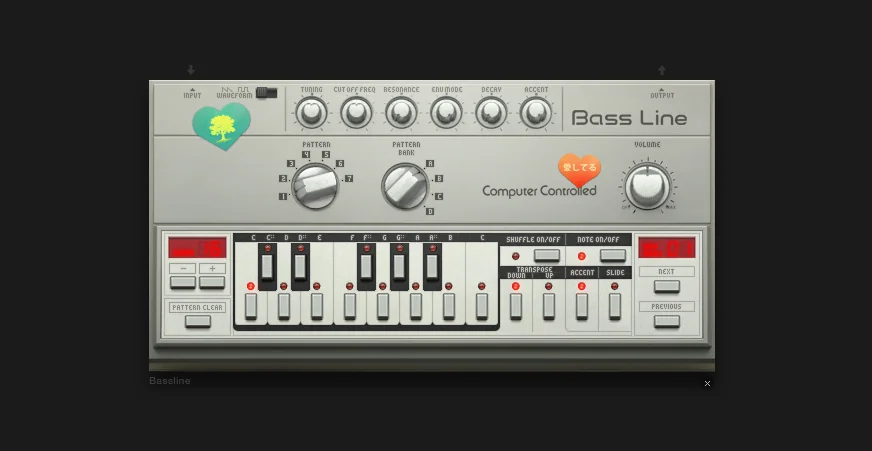
Bassline is a monophonic bass synthesizer with a built-in step sequencer. Single oscillator (Sawtooth or square wave) with a powerful filter and envelope modulation. Create squelchy, resonant basslines with Accent, Slide, and Groove for classic acid grooves.
Monophonic bass synthesizer
Built-in step sequencer (1-99 steps per pattern, 28 patterns total)
Single oscillator (Sawtooth or square wave)
Low-pass filter (220-12000 Hz) with envelope modulation
External audio input support
Microtuning support
Controls
Sound shaping
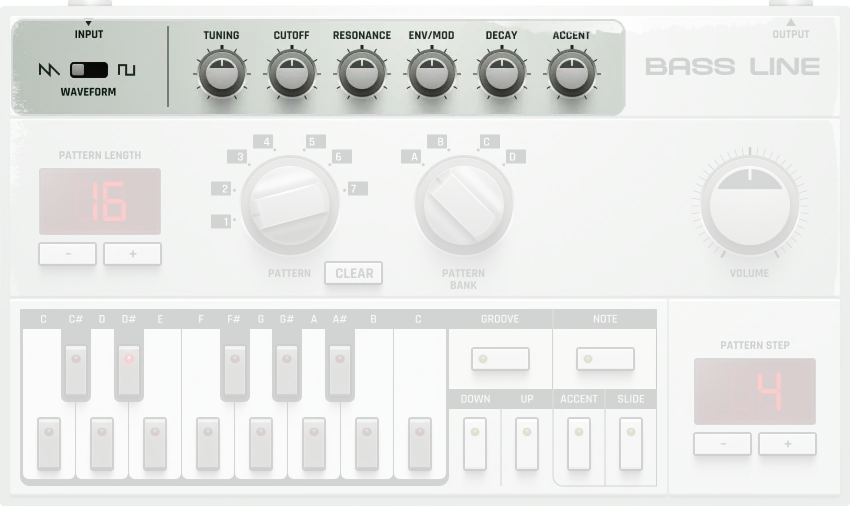
The top panel controls the sound shaping parameters:
Waveform selector |
Determines whether the device generates either a Sawtooth (1) or square wave (2). 1-2 (Sawtooth) |
|---|---|
Tuning |
Fine tuning of the output signal in semitones. -12 to +12 semitones (±1 octave) |
Cutoff |
Cutoff frequency for the internal low-pass filter. 220-12000 Hz |
Resonance |
Filter resonance amount. 0-100% |
Filter Decay |
Duration of the decay stage of the filter envelope. 0-100% (shorter decay) |
Envelope Modulation Depth |
Controls the impact of the filter envelope on the filter cutoff frequency. 0-100% |
Accent wheel |
Controls the strength of accented notes in the sequence (affects volume and filter behavior). 0-100%. Only works when Accent button is used on at least 1 step |
Volume/Gain |
Master volume control. -∞ to 0 dB (0.708 normalized) |
Patterns
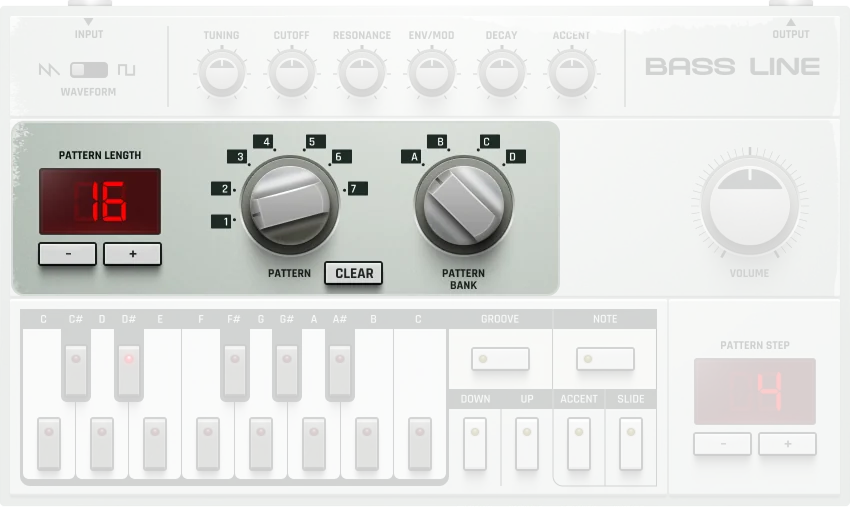
The middle area is where you can toggle through the device’s different internal patterns:
Pattern length |
Number of steps in the sequence. 1-99 steps steps |
|---|---|
Pattern length +/- |
Adjusts how many steps there are in the sequence. Hold Shift to double or half steps (2→4, 16→32, etc.) |
Pattern selector |
Allows you to toggle through patterns 0–27 (indices 0-27). Each pattern bank (A, B, C, D) contains 7 patterns, for a total of 28 patterns |
Clear pattern |
Deletes the selected pattern |
Pattern bank |
The Bassline has 4 different pattern banks (A, B, C, D). Each pattern bank contains 7 different patterns (total of 28 patterns, indices 0-27) |
Step Sequencer
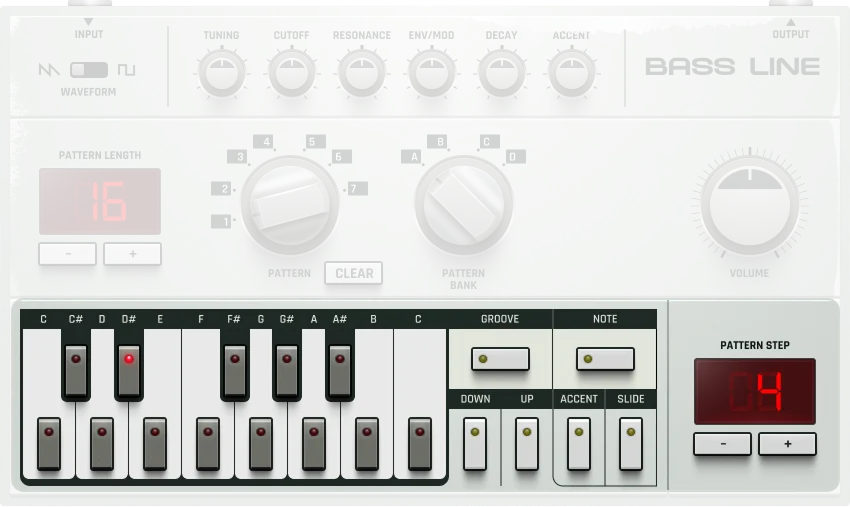
The bottom panel is where you program notes into the sequence:
Sequencer buttons |
Allows for definition of what note is played on each step. MIDI key range: 36-48 (one octave, C2-C3). Only one note can be played per step. (C2) |
|---|---|
Groove on/off |
Toggle any assigned groove on or off. Each pattern can have a groove applied individually |
Note on/off |
Controls whether the note for this step is active. . If off, the note for this step is not played |
Transpose down |
Transposes the note down one octave. -1 to +1 octaves |
Transpose up |
Transposes the note up one octave. -1 to +1 octaves |
Accent |
The accent button allows for the note to be accented (played louder with filter boost). . The strength can be controlled by the Accent Wheel in the top panel |
Slide |
Allows for the note to make a smooth transition into the next note (portamento/legato). . When enabled, the note slides from the last note played |
Step |
Displays which step in the sequence is currently selected and edited |
Step +/- |
Navigate through steps in the sequence |
Note Length: Slide
Bassline does not have a direct note length setting. Instead, it mimics the TB-303 style by using consecutive steps with Slide enabled to extend a note’s length.
How it works:
A single active step = a short 1/16 note
Consecutive steps with Slide and the same pitch = longer tied note
Examples:
Steps 1 only (Note On) → 1/16 note
Steps 1 & 2 (Slide on both, same pitch) → 1/8 note
Steps 1 to 4 (Slide on all, same pitch) → 1/4 note
To create a 1/4 note:
Activate Step 1 with Note On and set a pitch.
Set Steps 2–4 to the same pitch and enable Slide.
Keep Note On only for Step 1.
The note will play continuously across all 4 steps.
This is exactly how the original TB-303 worked—using Slide to create legato (tied) notes across multiple steps.
Additional Features
Audio Input |
The filter can be used with external audio input, allowing you to process external signals through the Bassline’s filter |
|---|---|
Audio Output |
Standard device audio output for routing to mixer channels or other devices |
MicroTuning |
Reference to microtuning settings. Each Bassline can reference a microtuning for alternative tuning systems |
Active/Inactive |
When inactive, no audio is produced by the bassline and input audio is not audible. |
Creating Patterns
Here’s how to create your first acid bassline pattern:
Select pattern and bank: Choose a pattern (0–27, or 1–7 within each bank A–D) using the rotary selectors.
Set pattern length: Use the Pattern length +/- buttons to set pattern length (1–99 steps).
Navigate to step 1: Use the Previous/Next buttons to select step 1 (shown in the step index).
Enter notes:
Press the sequencer buttons to choose pitch for step 1.
Enable Note On/Off to activate the note.
Add expression:
Add Accent for emphasis (volume and filter boost) using the Accent button.
Adjust the Accent Wheel in the top panel to set accent strength.
Add Slide for smooth pitch transitions.
Repeat for all steps:
Use Step +/- to move through steps.
Enter notes, accents, and slides for each step.
Play your pattern: Press Play in the transport bar.
Automate the filter: Automate Cutoff and Resonance for classic acid “squelch” effects.
Practical Tips
Practical Tips
Start with simple 8 or 16-step patterns, then add complexity with accents and slides.
Use Cutoff + Resonance automation for the classic acid “squelch” effect.
Route through reverb or bitcrusher for unique textures and character.
Create fills and variations by switching patterns live during playback.
Combine multiple Bassline machines with different patterns for complex arrangements.
Use Slide creatively to create smooth pitch transitions—the secret to classic acid basslines.
Hold Shift while adjusting pattern length to double or halve steps for quick variations (2→4, 16→32).
Match the TB-303 workflow: keep Note On only for the first step, enable Slide on subsequent steps for longer notes.