FX Sends
Essentials
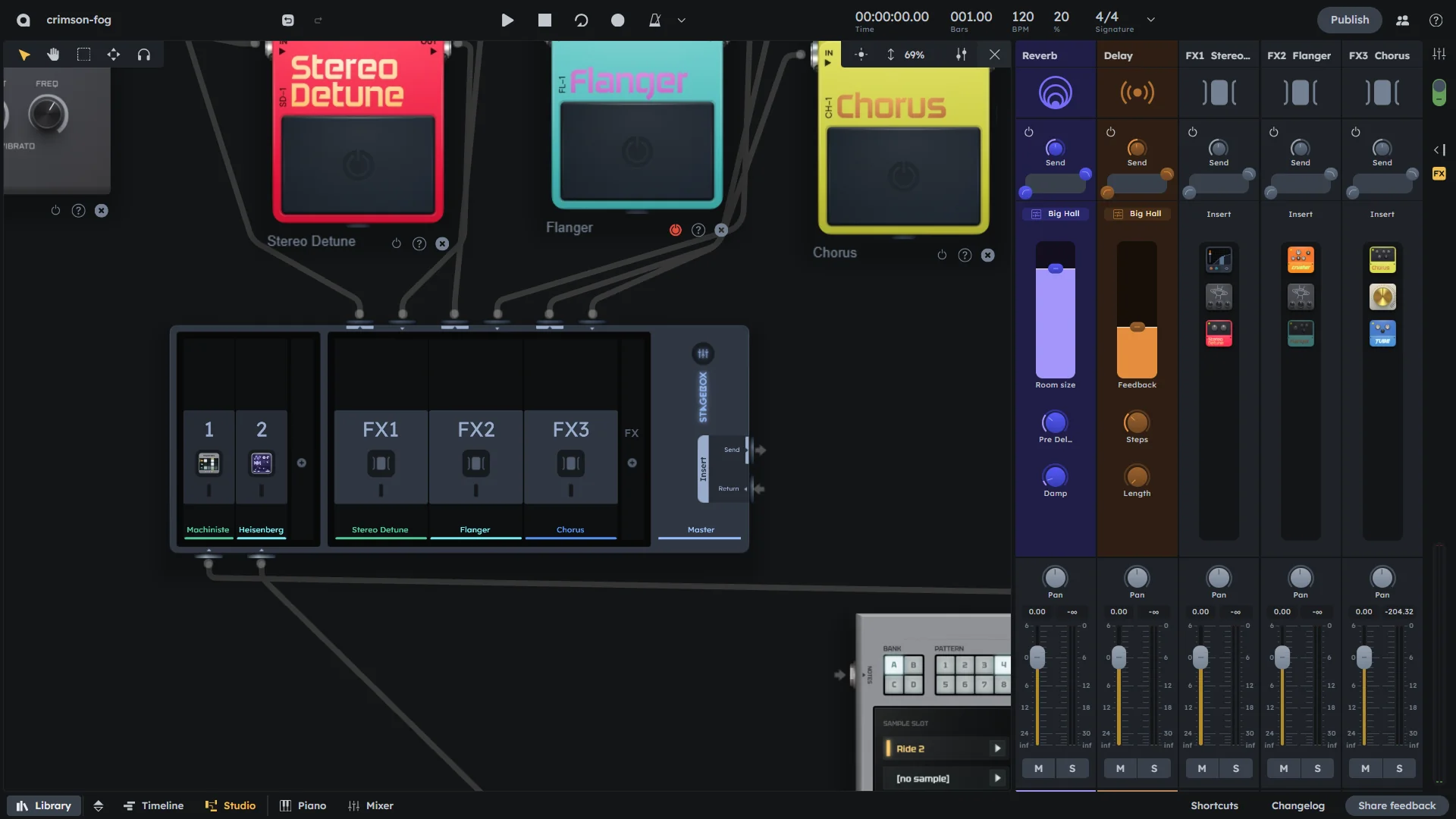
FX Sends add effects to tracks using built-in reverb and delay, plus custom effects connected to the Stagebox. Use sends to apply the same effect to multiple tracks (like a shared reverb) or create parallel processing chains. Each channel can send to multiple effects simultaneously.
Built-in reverb and delay sends (always available)
Custom effects via Stagebox for advanced routing
Per-channel send levels for individual control
Send vs insert: sends create parallel processing, inserts process the entire signal
Reverb (Built-in)
Each mixer channel has access to a built-in reverb effect that is always available and does not require patching. It adds spaciousness and depth to your sound.
Send & Filter |
Send and filter module for level and frequency control (see Gain & Filter). |
|---|---|
Room Size |
Controls the size of the reverb space (0-100%). |
Pre Delay |
Sets the delay before the reverb starts (8-500ms). |
Damp |
Controls the damping/high-frequency rolloff of the reverb (0-100%). |
Volume & Pan |
Controls the output level and stereo positioning of the reverb effect (see Volume & Pan). |
Delay (Built-in)
Each mixer channel has access to a built-in delay effect that is always available and does not require patching. It creates echo and rhythmic effects.
Send & Filter |
Send and filter module for level and frequency control (see Gain & Filter). |
|---|---|
Feedback |
Controls how much of the delayed signal is fed back (0-100%). |
Steps |
Sets the number of delay steps (1-7). |
Length |
Sets the delay timing: 1/16, 1/8T (triplet), or 1/8. |
Volume & Pan |
Controls the output level and stereo positioning of the reverb effect (see Volume & Pan). |
Custom FX
In addition to built-in effects, you can add external effects:
Send & Filter |
Send and filter module for level and frequency control (see Gain & Filter). |
|---|---|
FX Chain |
Preview of the effect chain as configured in the Stagebox. |
Volume & Pan |
Controls the output level and stereo positioning of the reverb effect (see Volume & Pan). |
Examples
Creating Space
Reverb |
|
|---|---|
Delay |
|
Dynamic Effects
Compression |
|
|---|---|
EQ |
|
Creative Processing
Modulation |
|
|---|---|
Distortion |
|
Practical Tips
Practical Tips
Use the Filter module to apply Low Cut to prevent low-end buildup.
Use reverb sparingly - too much can muddy your mix.
Sync delay times to your project tempo for musical effects.
Apply effects to groups for consistent processing.
Use the Stagebox for creative effect chains.
Balance wet and dry signals for optimal effect blending.
Consider using effects on sends rather than inserts for ambience.