Stagebox
Essentials
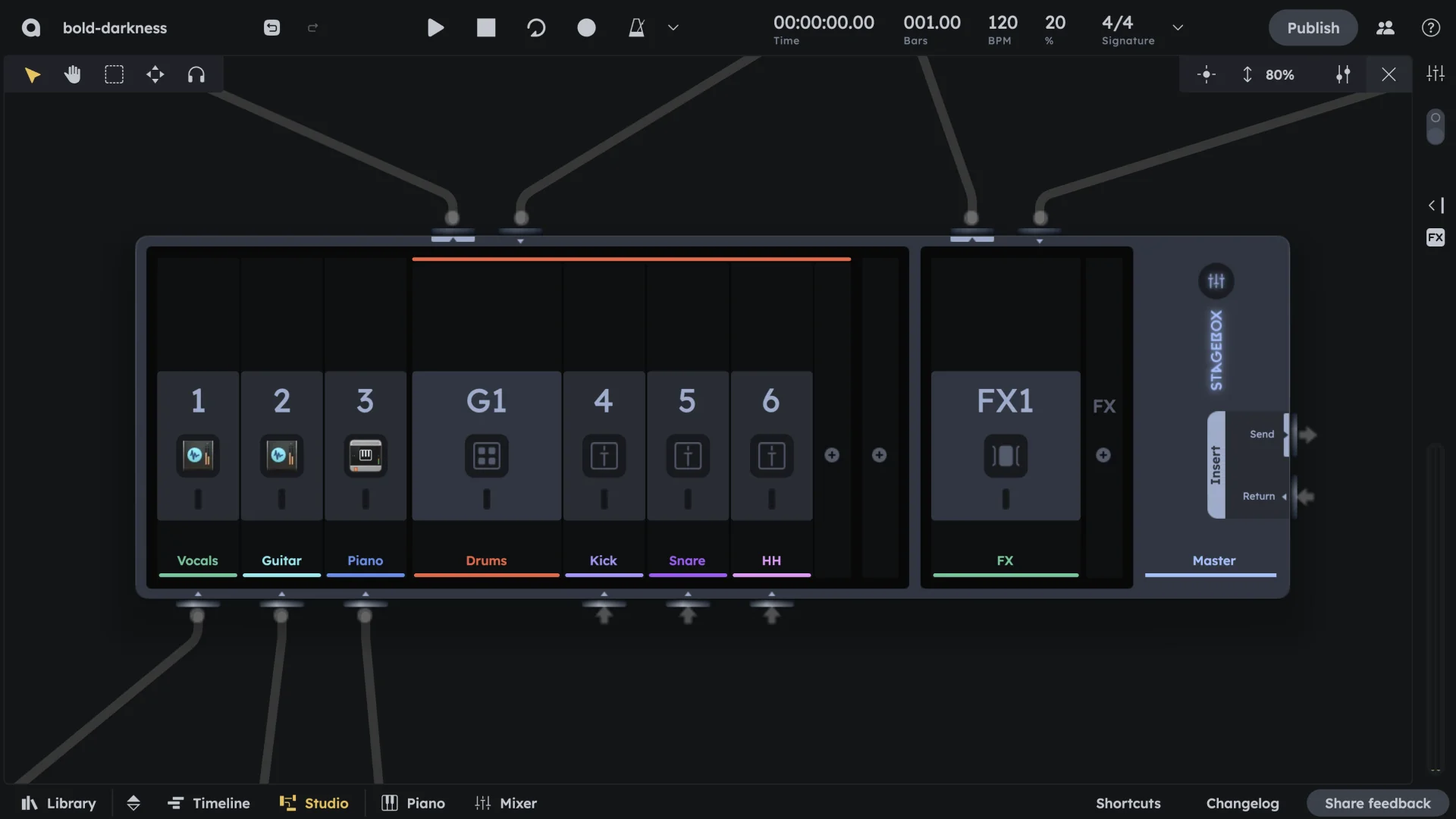
Stagebox is the central hub for routing and signal management in Audiotool. It interfaces directly with the Mixer, giving you modular control over inputs, groups, effects, and the master output. Use it to add custom effects to groups, create send/return effects, or process the master output.
Channel inputs for direct mixer routing
Group inserts for shared processing (add effects to groups)
FX inserts for send/return effects
Master routing for final output processing
Overview
The Stagebox is the central hub for routing and signal management in Audiotool. It interfaces directly with the Mixer (see Mixer), giving you modular control over inputs, groups, effects, and the master output.
The Stagebox is divided into four main sections:
Channel inputs |
Direct routing from mixer channels |
|---|---|
Group inserts |
Processing for grouped channels |
FX inserts |
Send/return effects routing |
Master routing |
Final output processing |
Each section allows you to patch audio signals freely within the modular studio environment.
Channel Inputs
Automatic creation |
Each input slot (labeled 1, 2, 3…) represents an input channel on the mixer. They are automatically created when you add tracks in the timeline (e.g., instruments, drums, audio) (see Device Browser). |
|---|---|
Labeling |
You can label them for clarity (e.g., “Vocals”, “Drums”). |
Device display |
Each slot shows the device or input currently routed to it. |
Mixer connection |
Each slot feeds into its corresponding mixer input channel (see Channels). |
Group Inserts
Creation |
These slots (e.g., G1, G2) appear when you group multiple mixer channels using Shift+Click and Cmd+G / Ctrl+G. |
|---|---|
Shared processing |
Each group collects audio from the mixer and routes it through a shared insert path (see Groups). |
Labeling and effects |
You can label groups and patch additional effects into them. |
Routing |
Mixer group channels send their output here. The group can then be routed to Master or another group (see Groups). |
FX Inserts
Send bus representation |
Each FX insert module (e.g., FX1, FX2) represents a send bus in the mixer’s FX section (see FX Sends). |
|---|---|
Adding slots |
Click the + above FX Inserts to add a new FX slot. |
Device connection |
Drag any effect device from the library into the Studio and connect it to the FX module’s jacks. |
Mixer integration |
The FX slot becomes selectable in the mixer (see FX Sends). All FX modules include a Highpass/Lowpass filter for basic tone shaping. |
Master Routing
Final stage |
Located at the far right, this handles the final stage of your mix. |
|---|---|
Insert points |
Insert Send and Insert Return let you patch mastering FX chains. |
Output processing |
The Master signal is routed through this section before playback/export. |
How It Connects to the Mixer
Channel inputs |
Correspond to each mixer channel strip (see Channels) |
|---|---|
Group inserts |
Mirror group channels in the mixer (see Groups) |
FX inserts |
Appear as send options in each mixer strip (see FX Sends) |
Master routing |
Applies final processing before audio leaves the system (see Master) |
Practical Tips
Practical Tips
Rename your Stagebox slots to keep sessions organized.
Use FX Sends for parallel processing.
Group Inserts are ideal for bus processing and stem control.