Matrix Arpeggiator
Essentials
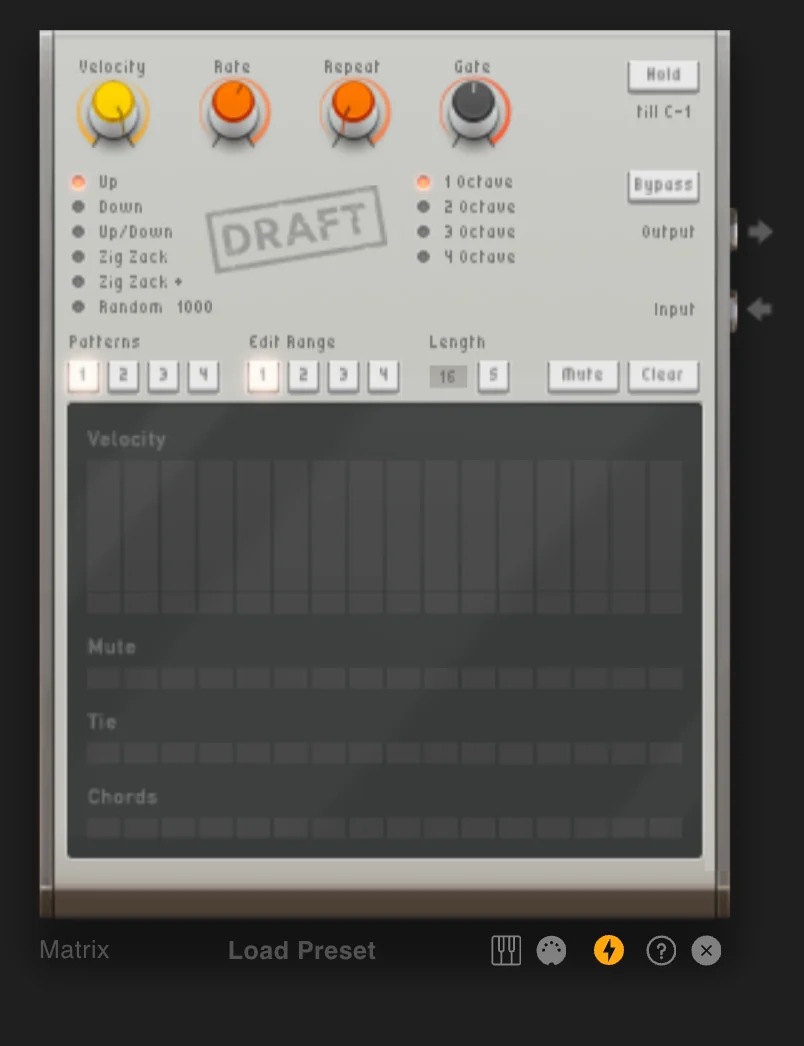
Matrix is a step-based arpeggiator designed to sequence incoming MIDI notes into dynamic arpeggios. Extensive control over note generation and playback with various directions, timing parameters, and pattern sequencing. Ideal for creating melodic sequences, rhythmic patterns, or evolving textures.
Step-based arpeggiator
Multiple playback directions
Timing parameters and pattern sequencing
Direction, rate, repeat, gate, and pattern chaining controls
Getting Started
The Matrix takes chords as input and plays them in succession rather than simultaneously, creating dynamic arpeggiated patterns with rhythmic and harmonic complexity.
Add a Matrix device to your project.
Connect its note output to a synthesizer (such as Heisenberg or Bassline).
Add a note track to the Matrix and draw chords.
The Matrix will automatically split chords into individual notes and play them according to your pattern settings.
Controls
Basic Parameters
The main knobs control individual note playback:
Velocity |
Controls the velocity of outgoing notes, unless overridden by a pattern step |
|---|---|
Rate |
Controls playback speed (e.g., 1/16 means one note every 1/16th note) |
Repeat |
Controls how often each note repeats before the next note is played. For example, your Notes are C E G, and you set Repeat to 2, it will play C C E E G G. |
Gate |
Controls note length as a multiplier of the rate. At 50% gate with 1/16 rate, notes play for 1/32nd note |
Strategy Selection
Controls the order and octave range for note playback:
Modes |
Up, Down, Up/Down, Zig Zack, Zig Zack +, Random 1000 |
|---|---|
Octaves |
Number of octaves to spread the pattern over (1-4 octaves) |
These directions determine how held notes are arpeggiated. For example, with chord notes 0 1 2: “Up” plays 0 1 2 0 1 2, while “Down” plays 2 1 0 2 1 0.
Global Settings
Hold |
When enabled, continues playing notes after chord release until new chord or stop note |
|---|---|
Bypass |
Forwards incoming notes directly, bypassing all arpeggiator processing |
Patterns
The Matrix offers extensive pattern creation and editing capabilities with up to 4 different patterns, each containing up to 64 steps.
Pattern Configuration
Controls how patterns are edited and played back:
Patterns |
Select and modify one of 4 different patterns |
|---|---|
Edit Range |
Choose which 16 steps of the 64-step pattern to view/edit |
Length |
Set pattern length; pattern loops after reaching this length |
Sync |
Determines if note order restarts with pattern or plays independently |
Mute/Clear |
Mute mutes entire pattern; Clear removes all pattern settings |
Pattern Steps
The pattern step section allows configuration of each individual step:
Steps |
Up to 64 steps per pattern in the step editor |
|---|---|
Velocity |
If set to more than 0, overrides the global velocity value. If 0, uses the global velocity setting |
Mute |
Mutes this step and plays nothing |
Tie |
Ties this step to the next one, meaning the next step won’t be played and the current step plays for twice as long (or however many tie steps follow) |
Chords |
Causes the entire incoming chord to be played for this step instead of individual notes |
Practical Tips
Practical Tips
Creating Arpeggios from Chords: Feed chord progressions to create melodic arpeggiated riffs. Use different modes (Up, Down, Zig Zack) for varied melodic movement. Combine with octave spreading for wider harmonic range.
Rhythmic Variation: Automate the Rate parameter to create tempo changes within patterns. Use Repeat to create rhythmic emphasis on specific notes. Adjust Gate for staccato vs. legato playing styles.
Advanced Pattern Techniques: Use Tie steps to create sustained notes and legato phrases. Apply Chords on specific steps to emphasize harmonic moments. Switch between patterns for dynamic arrangement changes. Use Hold mode for continuous arpeggiation without sustained input.
Creative Applications: Don’t just use chords as input, try using all notes from the scale you are playing in to get a walking bass style.
Advanced Techniques: Write 1 Bar long chords and use the Matrix to control the rhythm of the chords by activating Chords on all steps. The step pattern then determines when each chord plays.