Presets
Essentials
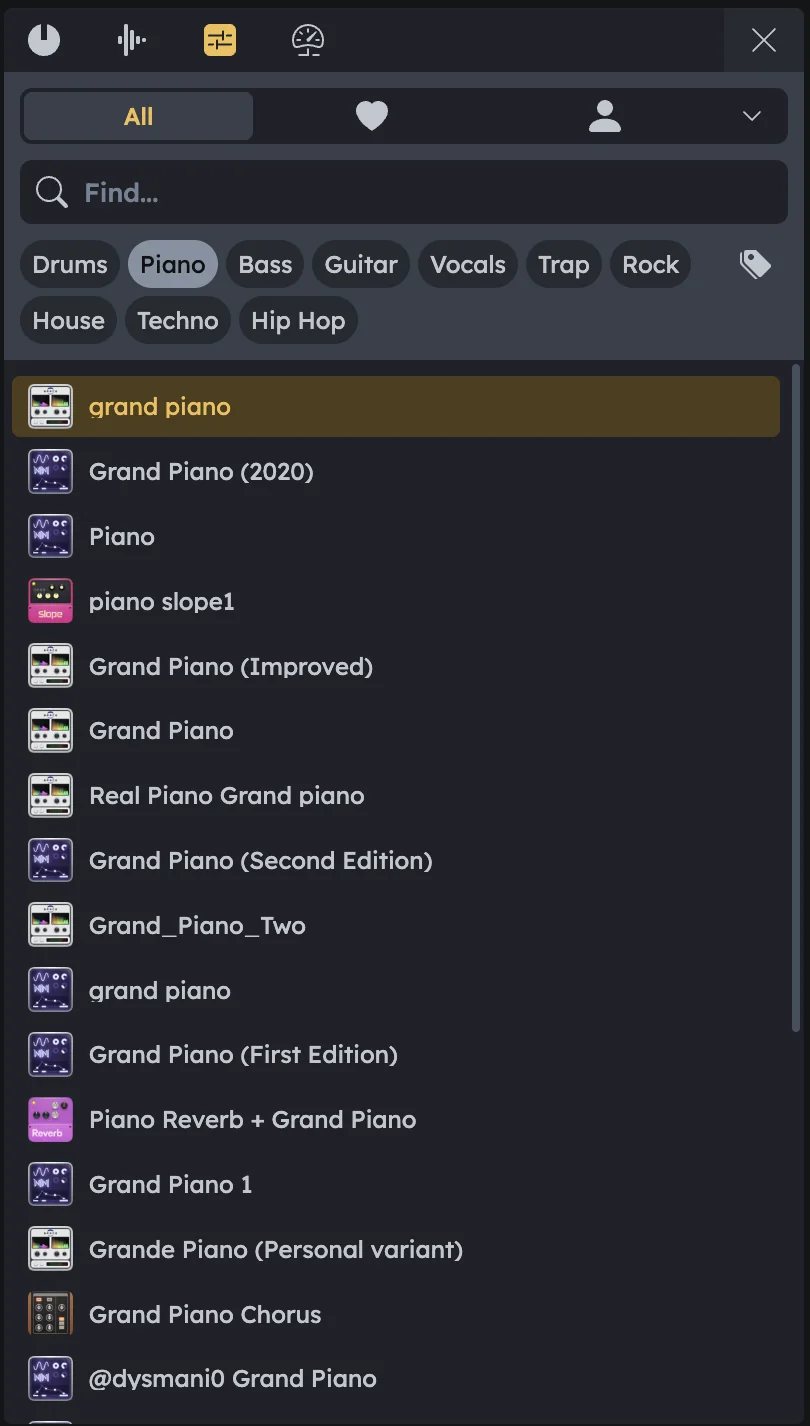
Preset Browser provides ready-made device presets for all Audiotool instruments and effects. Part of the Library panel, it allows you to quickly load sounds or effect setups without configuring devices from scratch. Preview presets with the on-screen keyboard, then drag them into your project.
Ready-made presets for all devices
Search and category filters
Quick drag-and-drop loading
Favorites system for quick access
Preview with on-screen keyboard
Browsing Presets
Tabs at the Top |
All: Shows all available presets. Heart (Favorites): Shows presets you have marked as favorites. User (My Presets): Displays your own saved presets. Sort Dropdown: Lets you sort the list (e.g., alphabetically or by popularity). |
|---|---|
Category Tags |
Filter presets by tags such as Drums, Piano, Bass, Guitar, Vocals, Trap, Rock, House, Techno, etc. |
Search Bar |
Enter keywords to quickly find presets (e.g., |
Preset List
Each entry in the list shows:
Device Icon |
Identifies which device the preset belongs to (e.g., Pulverisateur, Machiniste, Quasar). See Device Manuals. |
|---|---|
Preset Name |
The given name of the preset. |
Using Presets
Drag & Drop |
Drag a preset into the Timeline → a new track is created with the device loaded and preset applied (see Device Browser). Drag a preset onto an existing device → the preset replaces the device’s current settings. |
|---|---|
Favorites |
Click the heart icon to mark a preset as a favorite. |
Device-Specific Presets |
Right‑click on any device and select Load Preset → the Library will open and display only presets compatible with that device. |
Workflow Example
Open filtered view |
Right‑click on a device in your project and select Load Preset. The Library opens filtered to show only presets for that device. |
|---|---|
Browse and search |
Browse with tags, search, or sorting to find the sound you want. |
Apply preset |
Drag the preset onto the device, or into the Timeline to add a new track. |
Instant update |
The device will instantly update with the chosen preset settings. |